Ingham County Court Dockets list all filings, motions, and hearings for civil, criminal, family, probate, and juvenile cases. These dockets create an organized court case timeline that helps stakeholders stay informed about case progress. By reviewing docket entries, lawyers can prepare for hearings, and parties can track important dates without missing deadlines.
These dockets also include hearing logs, updates on motions, and other court activity. Ingham County Court Dockets make it easier to monitor legal proceedings, ensuring that cases move forward efficiently. For anyone involved in a case, they provide a reliable way to follow each step and stay up to date with filings and decisions.
How to Search Ingham County Court Dockets
Searching the Ingham County Court docket is done through the county’s official Court Record Search system at courts.ingham.org. Users can enter a case number, party name, or filing date to find case activity, hearing dates, and other court docket records.
Visit the Official Court Search Page
To start a court docket search, open the official Ingham County Courts online portal here:
https://courts.ingham.org/CourtRecordSearch
Select the Court to Search
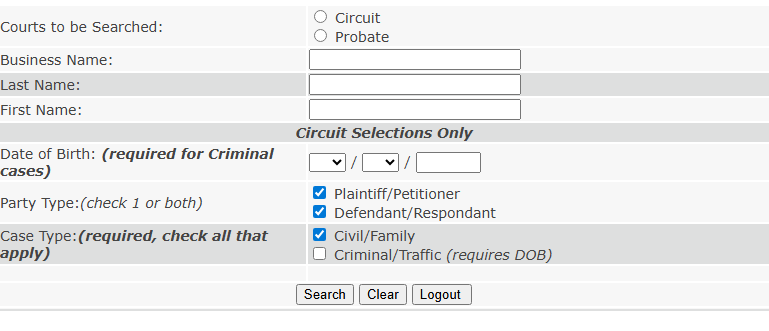
Once on the court record search page, you will be asked to choose which court’s records you want to search:
- Circuit Court
- Probate Court
Choose Your Search Method
The system allows several ways to pull up a docket:
Option A — Case Number
If you already know the case number, click the “Search by Case Number” link and enter it. This gives the most accurate results.
Option B — Party Name Search
You can enter:
- Last Name or Business Name
- First Name or Initial
Option C — Filing Date or Other Filters
Add other search filters such as filing dates or party type (Plaintiff/Defendant) where available.
Enter Required Fields
Depending on your chosen method, fill in the required boxes:
- Case Number, or
- Last Name / First Name / Date of Birth (for some criminal records)
Review Results in the Public Court Database
After submitting the search, you will see a list of matching cases. Results usually show:
- Case number & type
- Parties involved
- Docket history / hearing dates
- Filing events and outcomes
Court Docket Terminology
Case docket information provides a detailed record of all activities in a court case. Docket entries are the individual records of filings, hearings, and decisions, helping parties and the public track case progress.
Key Terms in Court Dockets
- Docket Entry: A single record of an action or event in a case, such as a motion filed, a hearing held, or an order issued.
- Case Number: A unique identifier assigned to each court case. It ensures all filings and proceedings are properly tracked.
- Filing Date: The official date a document or motion is submitted to the court and recorded in the docket.
- Hearing Schedule: Dates and times when court proceedings, including motions, trials, or status conferences, are set to occur.
Hierarchy of Docket Information
Court dockets are structured in a chronological and hierarchical manner:
- Filing: The first step in any case is the submission of legal documents. This includes complaints, petitions, or other initiating documents.
- Hearings: Scheduled court appearances, such as pre-trial conferences, motion hearings, or settlement discussions, are recorded after the filing.
- Judgments / Orders: Final decisions, rulings, or court orders are documented at the end of the case process.
Types of Cases in Ingham County Court Dockets
Ingham County court dockets cover a variety of case types, each with unique procedures and ways of tracking case progress. Understanding these categories helps the public, attorneys, and parties monitor the status of cases efficiently.
Criminal Cases
Criminal dockets track offenses ranging from misdemeanors to felonies. Typical entries include:
- Indictments: Official charges filed against a defendant.
- Arraignments: The first court appearance where charges are formally read and pleas entered.
- Trials: Court proceedings to determine guilt or innocence.
Civil Cases
Civil cases involve disputes between individuals or organizations. Common types include:
- Lawsuits: Disagreements over damages or remedies.
- Property Disputes: Conflicts involving land, ownership, or boundaries.
- Contracts: Breaches or enforcement issues.
Family Court Cases
Family court dockets cover sensitive matters related to domestic and familial issues. Entries often include:
- Custody Hearings: Decisions regarding child placement and parenting time.
- Divorce Proceedings: Filing dates, hearings, and final judgments.
- Support Cases: Alimony, child support, or spousal maintenance arrangements.
Juvenile Cases
Juvenile dockets track cases involving minors, focusing on rehabilitation and protection. Key case types include:
- Delinquency: Minor offenses and their adjudication.
- Dependency: Situations involving child neglect or abuse.
- Probation Hearings: Review and monitoring of court-ordered probation for juveniles.
Reading and Interpreting Docket Entries
Docket entries are the backbone of a court case record, showing a detailed filing history and sequence of events. Understanding how to read these entries allows parties, attorneys, and the public to track case updates and court activities accurately.
Steps to Interpreting Docket Entries
Start with the Case Header
Every docket begins with basic case information:
- Case Number: Unique identifier for the case.
- Case Type: Criminal, civil, family, or juvenile.
- Parties Involved: Names of plaintiffs, defendants, or petitioners.
Review the Filing History
Docket entries are listed chronologically, documenting each court action. Common filings include:
- Complaints or Petitions: Initial documents filed to start the case.
- Motions: Requests made to the court, such as motions to dismiss or for summary judgment.
- Responses and Answers: Parties’ formal replies to filings.
Check Hearing and Event Logs
Docket entries also list scheduled court proceedings:
- Hearings: Dates for pre-trial, status conferences, or motions.
- Trials: Dates when the case is formally adjudicated.
- Status Updates: Notes by the court clerk indicating delays, continuances, or rescheduled hearings.
Understand Judgments and Orders
Final entries often record outcomes:
- Judgments: Decisions made by the court.
- Orders: Directives or rulings issued during the case.
Abbreviations and Legal Terms
- MTN: Motion
- ORD: Order
- CLERK: Clerk’s administrative note
- CONT: Continuance (postponement of a hearing)
- DISP: Disposition or case resolution
Case Timeline and Progress Tracking
A court case timeline shows the chronological progression of a case from filing to final resolution. Tracking case progress allows parties, attorneys, and interested individuals to stay informed about key events and deadlines.
Tracking a Case from Filing to Resolution
Every case begins with the initial filing, which starts the procedural history. This includes complaints, petitions, or charges, depending on the case type. After filing, the docket records all subsequent activities, including motions, hearings, and court orders. Users can follow the court case timeline by noting:
- Filing Date: When the case officially begins.
- Hearings and Motions: Scheduled events that advance the case.
- Judgments or Orders: Final rulings or resolutions that close the case.
Efficient Monitoring of Case Updates
Staying up-to-date requires checking case updates regularly. Online docket systems and public court databases provide real-time entries of filings, upcoming hearings, and rulings. Monitoring these entries helps avoid missed deadlines and ensures timely preparation for hearings. Key information to track includes:
- Next Hearing Date: Crucial for scheduling appearances or preparing responses.
- Recent Motions or Orders: Indicates recent developments affecting case strategy.
- Pending Actions: Highlights tasks or filings still required for case progression.
Importance of Timely Information
Access to current docket entries and case progress ensures that all parties are aware of procedural changes and upcoming events. Timely information reduces the risk of missed court dates, fines, or procedural setbacks. It also allows attorneys to advise clients effectively and maintain compliance with court requirements.
Special Notes on Court Docket Confidentiality
Ingham County court dockets provide public access to case activity, but not all information is available due to legal and privacy considerations. Some cases contain restricted information, while others remain fully accessible as public records.
Public vs. Restricted Case Information
Most docket entries are part of the public record and include details like filing dates, hearings, motions, and judgments. These entries allow parties, attorneys, and researchers to track case progress efficiently. However, certain cases are confidential to protect privacy or sensitive information. Examples of restricted cases include:
- Juvenile Cases: Records involving minors are typically sealed to safeguard their identities.
- Family Cases: Custody, adoption, and domestic violence cases may have limitations on public access.
- Sealed Cases: Court orders can restrict access to specific cases or documents due to security or privacy concerns.
Accessing Sensitive Cases
Access to restricted or sealed dockets generally requires court permission through a formal request or motion. Authorized parties, such as attorneys, guardians, or individuals directly involved in the case, may be granted access under legal supervision. Compliance with laws such as juvenile protection statutes governs who can view these records. Even when access is granted, courts may provide only limited information or summaries rather than the complete documents to protect privacy.
Legal Obligations and Privacy Considerations
Court clerks and judicial staff must follow strict rules to protect privacy and prevent unauthorized disclosure. Users of Ingham County court dockets should:
- Avoid attempting to access sealed or restricted records without proper authorization.
- Use information obtained from public records responsibly.
- Understand that misuse of confidential information can have legal consequences.
History of Ingham County Court
The Ingham County court history dates back to the early 19th century, playing a central role in the development of Michigan’s judicial system. Established shortly after Ingham County itself was organized in 1829, the court has been responsible for administering justice across civil, criminal, family, and juvenile cases for nearly two centuries.
Establishment and Early Years
Ingham County courts were initially formed to address the legal needs of a growing population in the Lansing area and surrounding townships. Early proceedings focused on property disputes, contracts, and criminal matters. Judges were appointed to oversee court sessions, and records were meticulously maintained, forming the foundation for the county’s legal documentation. These early courts established the framework for modern procedures and the systematic handling of cases that continues today.
Key Milestones and Developments
Over the years, the Ingham County court system has undergone significant developments. The construction of permanent courthouses, the expansion of circuit and probate courts, and the introduction of specialized divisions such as family and juvenile courts marked important milestones. The adoption of digital record-keeping and online docket access in recent decades represents a modern evolution, making court case information more accessible to the public and legal professionals alike.
Historical Significance
- Landmark cases and procedural innovations influenced statewide criminal, civil, and family law practices.
- The court has played a key role in shaping local policies and ensuring fair treatment for residents.
- Preservation of public records and transparent processes strengthened public trust.
- Demonstrates a balance of tradition and modernization while serving the community.
Location & Contact Information
The Ingham County court location is centrally situated in Lansing, Michigan, providing easy access for residents, attorneys, and visitors. The main courthouse, known as the Veterans Memorial Courthouse, serves as the primary venue for civil, criminal, family, and probate cases.
Main Courthouse Name: Veterans Memorial Courthouse
Primary Address: 313 West Kalamazoo Street, Lansing, MI 48933
Secondary Location (Circuit Court Administrative Services): 315 S. Jefferson Street, Mason, MI 48854
Phone Numbers:
- Circuit Court Clerk: (517) 483‑6500
- Jury Administration: (517) 483‑6422
- Family Court / Friend of the Court: Contact via Clerk’s Office
Operating Hours: Monday–Friday, 8:30 AM – 4:30 PM (excluding holidays)
Parking: Public and metered parking available near the courthouse
Frequently Asked Questions
Ingham County court dockets provide a detailed record of case activity, filings, and hearings. This FAQ section addresses common questions about accessing and understanding docket information.
How can I check the status of my case?
To check your case status, you can perform a court docket search on the official Ingham County Courts website. By entering your case number, party name, or filing date, you can view all relevant docket entries including hearings, motions, and orders. This allows parties to track case progress from filing through resolution efficiently. For cases not fully digitized, you may need to visit the Clerk’s Office in person.
What do the different docket entries mean?
Each docket entry represents a specific event in a case. Common entries include filings, motions, scheduled hearings, court orders, and judgments. Filings show when documents were submitted, motions indicate requests made to the court, and hearings record scheduled court appearances. Understanding these entries helps interpret the procedural timeline and monitor hearing logs and other updates. Courts may also use abbreviations such as MTN for motion, ORD for order, or CONT for continuance.
Can anyone access court dockets online?
Most Ingham County court dockets are publicly accessible, but some cases may have restrictions. Sensitive matters, including juvenile cases, certain family law cases, or sealed cases, are not fully available online due to privacy considerations. General public access is available for civil, criminal, and probate matters, while attorneys or authorized parties may request additional access for restricted cases through the Clerk’s Office.
How often is the docket updated?
Dockets are updated regularly to reflect new filings, scheduled hearings, and court orders. Updates typically occur on the same day events are recorded in the system, ensuring that users reviewing the court docket search have access to current information. Checking the docket frequently helps parties stay aware of upcoming hearing logs or procedural changes.
How to get a certified copy of docket information?
Certified copies of docket entries or other court records can be obtained through the Clerk’s Office. Requests usually require providing the case number, names of parties involved, and sometimes a valid form of identification. Fees may apply for certified copies, and processing times vary. Some courts allow requests in person, by mail, or online through official portals.